Live
VS Code Extension
For developers
Install ExtensionSeamlessly sync color palettes across VS Code, Figma, and colorStudio. Build accessible designs faster with workflow integration that works where you work.
For developers
Install ExtensionFor designers & developers
Open colorStudioFor designers
Install in FigmaExperience the power of weableColor directly in your VS Code workflow
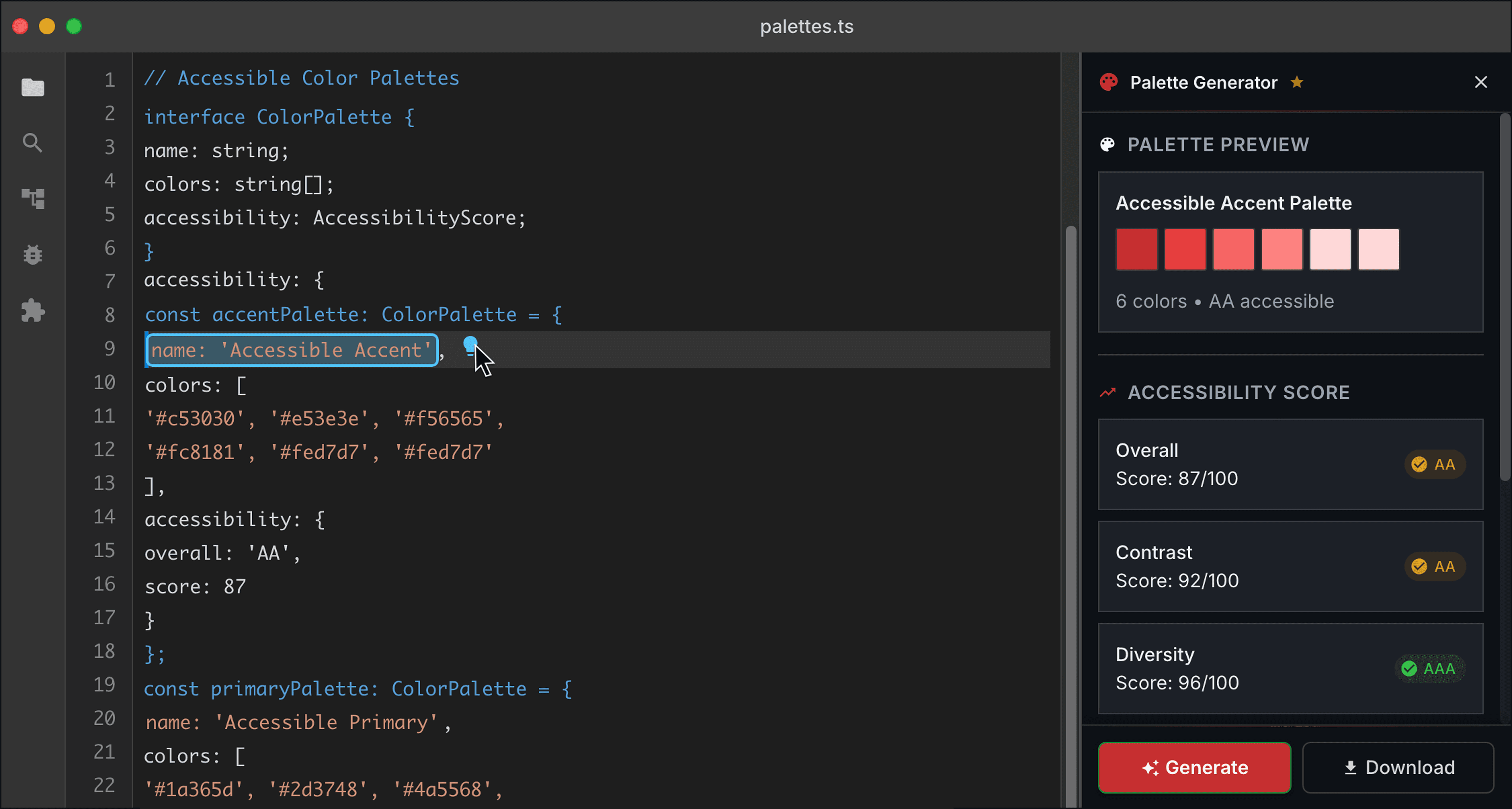
Tired of manual checks? Instantly calculate accurate contrast ratios for both WCAG 2.1 AA/AAA and APCA standards, ensuring your colors are always compliant.
Stuck with failing colors? Automatically find the minimum, most aesthetic adjustment needed to meet contrast targets, saving you time and design integrity.
Struggling to build accessible themes? Quickly generate harmonious and accessible color schemes based on your primary color, ensuring brand consistency and compliance.
Need precise color control? Access powerful functions for seamless color conversion (RGB, HSL, Hex), lightening, darkening, blending, and more, all while maintaining accessibility.
Sync palettes from Figma to VS Code instantly. Build accessible components with colors that stay in sync across your entire workflow.
Maintain consistent, accessible color palettes across VS Code, Figma, and colorStudio. One source of truth, everywhere you work.
Deliver accessible projects faster with workflow integration. Design in Figma, code in VS Code, validate in colorStudio—all synced seamlessly.
Integrate our accessibility-first color logic into your products via API or library. Build on a foundation that prioritizes inclusive design.
Recent activity from the community
Type /contrast #1a1a1a #f5f5f5 in Slack for a live ratio and AA/AAA checklist — same weableColor library as the free web checker.
See how developers use our CLI tools in real workflows
weableColor Terminal
$
Get started with basic contrast checking
npm install @weable-tools/a11y-color-utils

import { calculateContrastRatio, checkContrast } from '@weable-tools/a11y-color-utils';

// Check if colors meet WCAG AA standards
const ratio = calculateContrastRatio('#ffffff', '#000000');
const isAccessible = checkContrast('#ffffff', '#000000', 'AA');

console.log(`Contrast ratio: ${ratio}`);
console.log(`WCAG AA compliant: ${isAccessible}`);Generate accessible color palettes automatically
// Generate accessible color palette
import { generateAccessiblePalette } from '@weable-tools/a11y-color-utils';

const palette = generateAccessiblePalette('#0078D7', {
  targetContrast: 4.5,
  includeVariants: true
});

console.log(palette);
// Output: { primary: '#0078D7', light: '#4A9DE8', dark: '#005A9E', ... }Recent activity from the community
UX Designer @ Innovatech
“This tool fundamentally changed how I approach color selection. Ensuring AA/AAA compliance is now effortless.”
Frontend Developer @ CodeCrafters
“Integrating the color utils library was seamless. It caught contrast issues I would have missed.”
Accessibility Consultant
“I recommend weableColor Utils to all my clients. It simplifies a complex aspect of accessibility.”
Digital Agency Owner
“Ensuring our client sites are accessible is crucial. This tool makes achieving color compliance straightforward.”
Check WCAG contrast on real layers, fix colors in-file, preview color-blind views, and export CSV reports — without leaving Figma. Install free from Community; Pro unlocks export and cross-tool workflows.
Pass/fail on page or selection, then layer-level contrast with a clear next step.
Explore harmonies, then apply suggested fills and strokes without leaving the file.
Color-blind preview in flow; Pro unlocks CSV reports and cross-tool sync with VS Code and colorStudio.
Design in Figma, code in VS Code, validate in colorStudio — same accessibility-first color story across the stack.